This document specifies the structure of the Manifest text file used to upload shipping manifest information to CReME™
File FormatCReME™ currently supports only .csv format (Comma Separated Values) .
Upload FileEvery Manifest file will contain 12 or 17 columns and up to a few thousand rows. Each column accomodates up to 100 characters. The sequence of the columns is listed below (the alphabets are columns in the Excel/.csv spreadsheet)
Two types of manifests are shown:
MDB=Malaysian Domestic Business
Each type of Manifest can contain 3 types of records: Chassis Number (CN), Temporary Vehicle Tag (TVT) and Package (PKG).
TVT is the abbreviation for Temporary Vehicle Tag (formerly known as dummy tag). When a TVT is present in a manifest, only 3 columns are required. For a ChassisNo, more columns are required.
| Alphabet | Column Title | Column Description | Export+MDB | others | ||||
|---|---|---|---|---|---|---|---|---|
| ChassisNo | TVT | Package | ChassisNo | TVT | Package | |||
| A | No | An integer (no decimal allowed) beginning from 1. Each unit to have a unique number | Yes | Yes | Yes | Yes | Yes | Yes |
| B | Type | Indicates the type of unit. Only 3 types are allowed: CN (chassis Number of a vehicle), TVT (Temporary Vehicle Tag), or PKG (Package). | Yes | Yes | Yes | Yes | Yes | Yes |
| C | Consignee Name | Yes | Yes | Yes | Yes | |||
| D | BL No | Yes | Yes | Yes | Yes | |||
| E | Chassis No | If Type=TVT, the ChassisNo must be unique. This means it should not be duplicated in a shipment and should not be reused in another shipment. This field can be left empty for Type=PKG | Yes | Yes | Yes | Yes | ||
| F | Engine No | Yes | Yes | |||||
| G | Make | Yes | Yes | |||||
| H | Model | Yes | Yes | |||||
| I | Discharge Port | Yes | Yes | Yes | Yes | Yes | Yes | |
| J | Forwarding Agent | Yes | Yes | |||||
| K | Shipper Name | Yes | Yes | |||||
| L | Description | Usually for Type=PKG. Not used for Type=CN or Type=TVT | Optional | Optional | ||||
| M | Weight | Yes | Yes | Yes | ||||
| N | Length | Yes | Yes | Yes | ||||
| O | Width | Yes | Yes | Yes | ||||
| P | Height | Yes | Yes | Yes | ||||
| Q | Volume | Yes | Yes | Yes | ||||
Each shipment requires two types of information:
These two types of information are listed in the table below. Also shown here is the data that used to be present in manifests of the previous system but is no longer required (discontinued).
| User input | From manifest file | Discontinued | ||
|---|---|---|---|---|
| Validated | Not validated | |||
| 1) Vessel Name | yes | |||
| 2) Voyage No | yes | |||
| 3) Import/Export | yes | |||
| 4) Shipping Agent | yes | |||
| 5) ETA/ETD | yes | |||
| 6) Ship Call No | yes | |||
| 7) No | yes | |||
| 8) Type | yes | |||
| 9) Consignee Name | yes | |||
| 10) BL No | yes | |||
| 11) Chassis No | yes | |||
| 12) Engine No | yes | |||
| 13) Make | yes | |||
| 14) Model | yes | |||
| 15) Discharge Port | yes | |||
| 16) Forwarding Agent | yes | |||
| 17) Shipper Name | yes | |||
| 18) Weight | yes | |||
| 19) Volume | yes | |||
| 20) Description | yes | |||
| 21) Length | discontinued because not required | |||
| 22) Width | discontinued because not required | |||
| 23) Height | discontinued because not required | |||
| 24) Vehicle Type | discontinued because present in Model Master | |||
If the Type=TVT, each ChassisNo must be unique unique from those used for the previous import shipments.
Example: PCYLDR00910001,
with “PCYLDR” being the vessel’s name - Procyon Leader,
and “0091” being the voyage number,
and “0001” being a running number.
A manifest may contain a list of ChassisNos or TVTs. Both pieces of information will be located at the ChassisNo of the manifest. CReME is able to differentiate between the two because a ChassisNo has the Model column populated whereas when the ChassisNo contains a TVT, the Model column is empty. A row that contains a TVT must have three columns populated: "No", "ChassisNo" and "DischargePort". An example of a manifest containing TVTs is shown below.
The manifest uploaded with some of the rows consisting of TVTs instead of the actual ChassisNos(e.g. 6 units “SCV135A2AV0001” to “SCV135A2AV0006”).
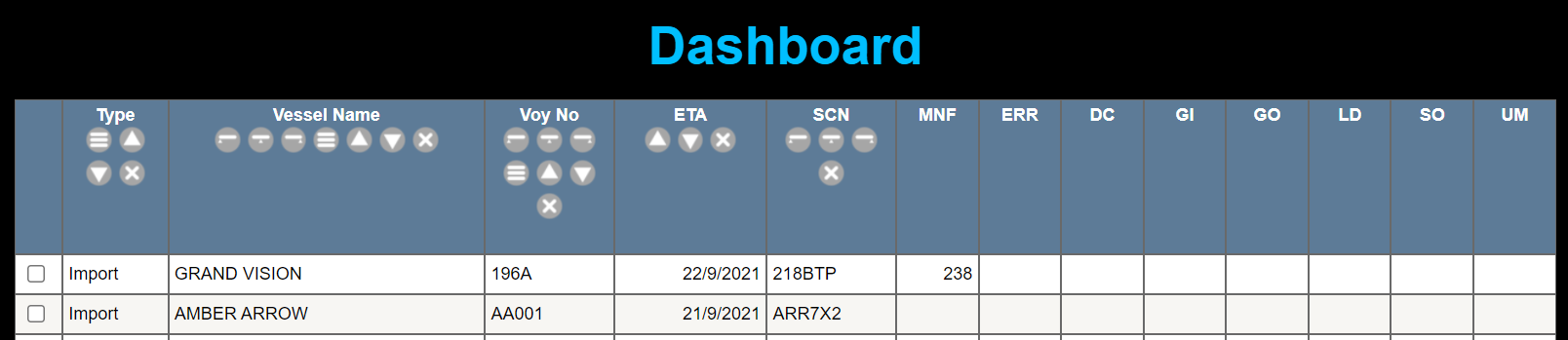
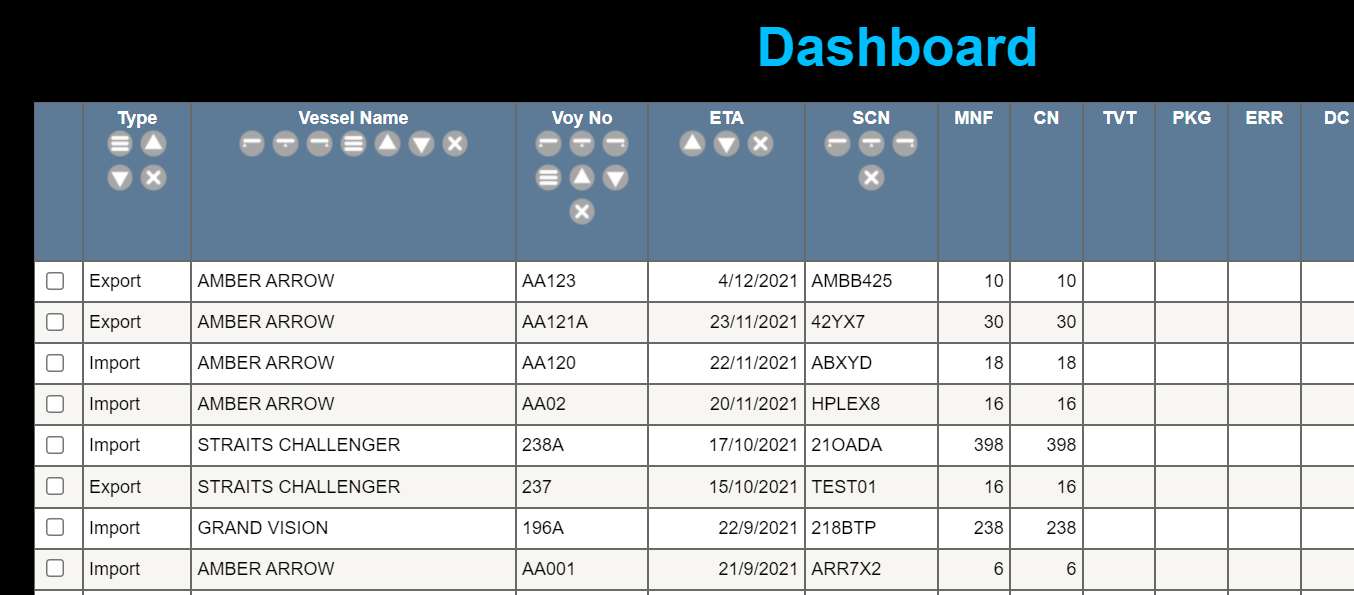
After uploading the 1st manifest, the dashboard reflects the number of actual ChassisNos in that manifest. The number of TVT rows are not included in the "MNF" tally. No movements have taken place yet.
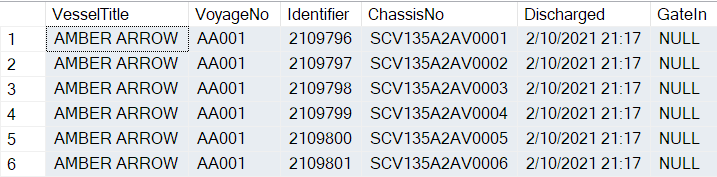
The TVT is scanned as each car is discharged from the vessel along with the driver’s tag. The TVT is placed inside the car after scanning it. Assuming the 6 TVTs have been scanned, the manifest data within CReME™ will be updated with the Discharge time as shown below.
After scanning the TVTs, CReME is able to generate the outturn reports during vessel operations (as a tally of the number of units discharged). A sample is shown below.
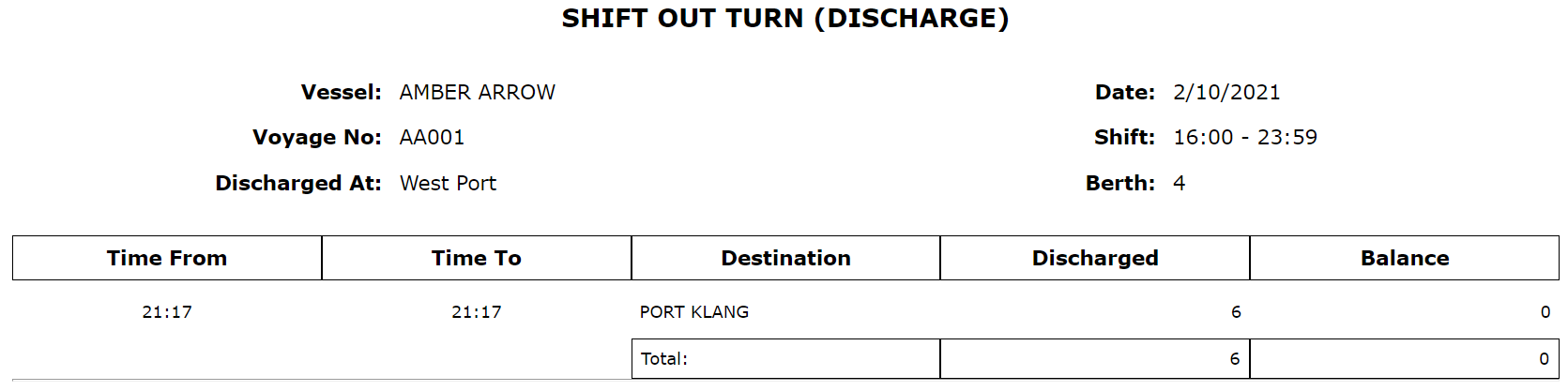
The out turn reports tally with the dashboard showing the 6 units in the manifest and 6 units discharged.
After vessel operations are completed, another manifest is uploaded with the actual chassis numbers. The 2nd manifest contains the same number of units as the 1st one. An example of such a manifest is shown below.

By this time, all the cars are already parked inside the yard. The yard-marshallers will place the barcodes with the actual chassis numbers in the cars.
Before placing each actual barcode in the car, the following are scanned in succession:
This action automatically replaces the data from the TVT to the actual ChassisNo in the manifest (e.g. date & time of discharge, driver’s details).
At the same time, the car is also registered as “Gate-in” into the system. Each time Parking2 is performed the TVT data and ChassisNo data in CReME™ will be linked to each other.
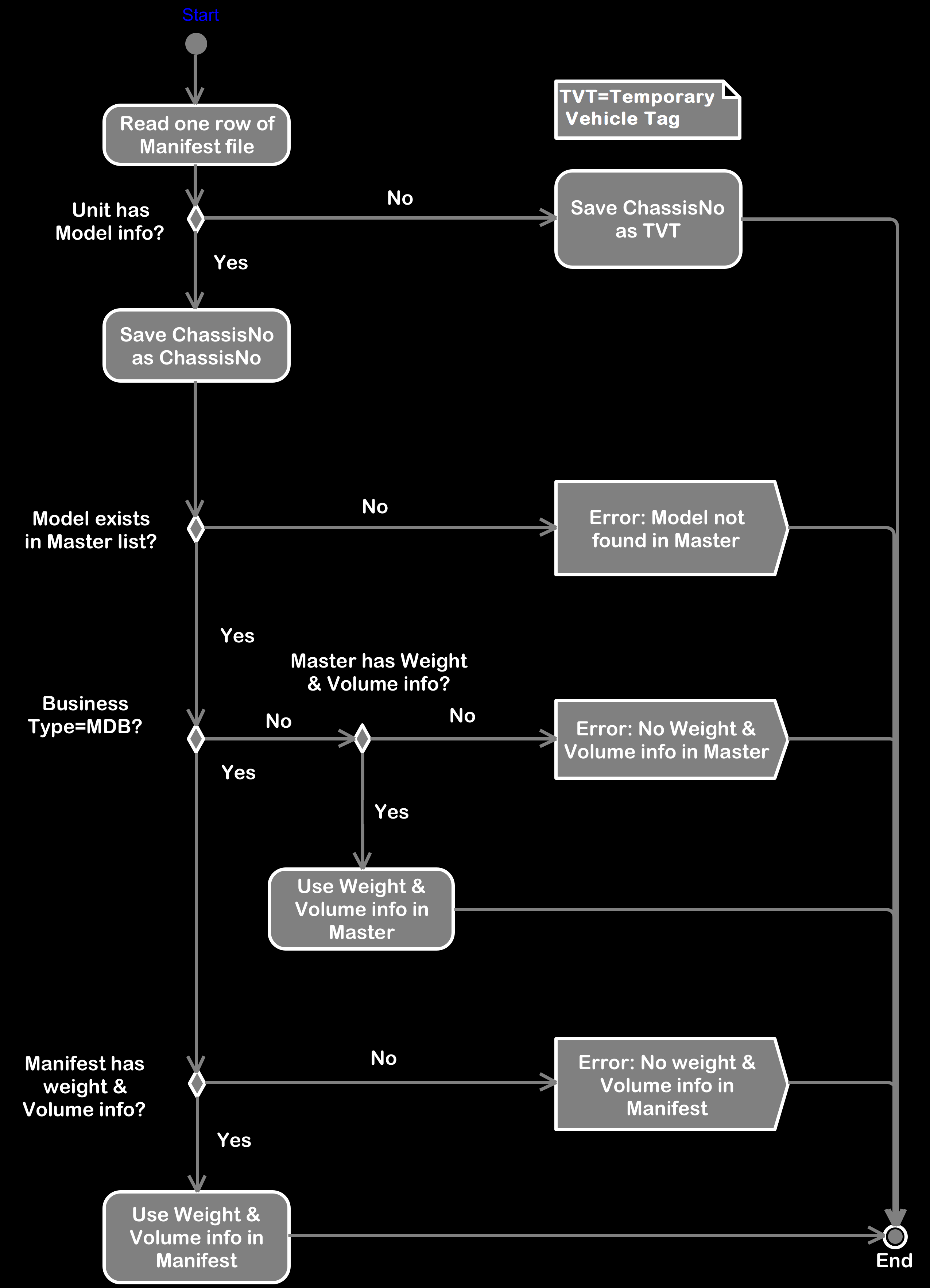
Process Flow of Manifest UploadThe ChassisNo column in the manifest will contain either the ChassisNo or the Temporary Vehicle Tag (TVT). If the Model column is empty, the ChassisNo is considered as TVT. If the model column is not empty, this is considered an actual ChassisNo.
When a ChassisNo is saved as TVT, the system expects the correct ChassisNo to replace this TVT when Parking 2 is carried out later on.
Some Shipping Agents such as Giga are considered "trusted". If a Shipping Agent is "trusted", CReME™ uses the Weight and Volume information from the manifest instead of the Model master list. If the Shipping Agent is not "trusted", the weight and Volume information in the Manifest is ignored and taken from the Model Master.