| Version Number | Date | Description | Changes |
|---|---|---|---|
| 2.00 | 22-Mar-2024 | Additional fields for SST | The additional fields required for SST are shown in section B1 for Invoice and section B3 for Credit & Debit Note Data. |
| 0.83 | 22-Jun-2023 | Revised Netsuite Item Codes | AJ emailed a revised list of Netsuite item codes. The table entitled Netsuite Segment Code has been updated. |
| 0.82 | 29-Apr-2023 | Process Interactions |
The Customer and Invoice processes interact with each other as explained in section D
(Customer and Invoice Process Interactions). The Invoice and Credit/Debit Note processes interact with each other as explained in section E (Invoice and Credit/Debit Note Process Interactions). |
| 0.81 | 17-Apr-2023 | Netsuite Responses | Rida emailed details of the Netsuite response. Section C4 has been updated. |
| 0.80 | 15-Apr-2023 | NetsuiteModeId removed from Credit and Debit Note. AJ requested to remove this from the Invoice structure on 17-Mar-2023. The removal from the Credit and Debit notes is to standardise the Line Item structure for all 3 financial documents. | Changes to the Line Item structure of the Credit and Debit note Data (section 3) table |
| 0.79 | 28-Mar-2023 | Destination/ToLocation fixed at "Port Klang" | Requested by Mr. Khoo in his email of 27-Mar-2023 |
| 0.78 | 28-Mar-2023 | NetsuiteModeId removed | Requested by AJ in his email of 17-Mar-2023. |
| 0.77 | 16-Mar-2023 | Invoice Number removed from Credit / Debit Note | Rida requested during the 16-Mar-2023 meeting to remove the invoice number from Credit /Debit Notes as the CremeInvoiceId is sufficient. |
| 0.76 | 16-Mar-2023 | CreationTimestamp for Invoice, Credit Note and Debit Note changed changed to Date |
This was agreed to by Rida during the 16-Mar-2023 meeting. This term is more meaningful as agreed by
Mr. Khoo during the same meeting. Sections affected by this change include: 1) Section B1 (Data Description) table describing the fields of an invoice. 2) Section B3 (Credit & Debit Note Data ) table describing the fields of an invoice. |
| 0.75 | 16-Mar-2023 | NetsuiteModeId and CremeVoyageId | Sections affected by this change include: 1) Invoice Line Items now have these two additional fields following a meeting with Mr. Khoo, AJ, Rida and Kugan on 16-Mar-2023. |
| 0.74 | 2-Mar-2023 | Business Activity and Activity Type have been replaced by NetsuiteItemId. |
Sections affected by this change include: 1) the table (fields of an invoice) Section B1 (Data Description - Invoice Data) 2) the table (mapping of CReME™ Charge Types to Netsuite Segment COdes) Section B2 (Data Description - Netsuite Segment Code) |
| 0.73 | 2-Mar-2023 | Invoices without NetsuiteCustomerId will be witheld. | Lyndon and AJ agreed to this on 22-Feb-2023. Changes appear in Send to Netsuite |
| 0.72 | 23-Feb-2023 | Introduction of Netsuite Business Activity Id and Activity Type Id | Business Activity and Activity Type in Section B1 (Invoice Data) have been replaced with Business Activity Id and Activity Type Id respectively. The mapping table in Section B2 (Netsuite Segment Code) now has these two additional columns. |
| 0.71 | 22-Feb-2023 | Netsuite Customer Id has been added. | Changes in section B (Data Description) and section C (Technical Aspects). |
| 0.70 | 17-Feb-2023 | Technical Aspects first described | Addition of 3rd section "Technical Aspects" |
| 0.64 | 31-Jan-2023 | 1) Sub-Activity removed | With reference to AJ's email on 31-Jan-2023, Sub-Activity is not required and so is removed from this specification. |
| 0.63 | 31-Jan-2023 | 1) Mapping table added | The mapping of CReME™ Charge Types to Netsuite Business Activity and Activity Type has been added under section 2) Netsuite Segment Code |
| 0.62 | 31-Jan-2023 | 1) Sub-Activity to be removed | During a telephone conversation with Mr. Khoo on 26-Jan-2023, Lyndon was advised the Sub-Activity only applies to other Giga subsidiaries and not Giga Car Terminal. This is to be removed upon confirmation from the Netsuite team. |
| 0.61 | 25-Jan-2023 | 1) Sub-Activity Elaboration | Elaboration from AJ's email on 25-Jan-2023 |
| 0.6 | 25-Jan-2023 | 1) Netsuite Segment Code elaboration | Elaboration from AJ's email on 18-Jan-2023 |
| 0.5 | 7-Jan-2023 | 1) Netsuite Segment Code has been elaborated further | Excerpt from the Netsuite Technical Requirement Document has been added |
| 0.4 | 29-Dec-2022 | 1) CReME Charge Type in invoice line items and Credit/Debit Note Line Items replaced by Netsuite Segment Code. | Following Lyndon's conversation with Mr. Khoo on 27-Dec-2022, future changes of general ledger and segment codes will be managed within CReME™. Netsuite should be able to accept new codes in future. |
| 0.3 | 22-Dec-2022 | 1) Deletion of financial documents no longer allowed | With reference to the email from Mr. Khoo on 22-Dec-2022, deletion of invoices, credit notes and debit notes is not allowed. |
| 0.2 | 21-Dec-2022 | 1) Change of description to Item Number in Section on Data Description | formerly integer beginning with "1" |
| 0.1 | 12-Dec-2022 | 1st draft |
This document describes the integration of the Create Financial Document use case between CReME™ and Netsuite. "Financial Document" includes invoices, credit notes and debit notes. Part A describes the Invoicing process. Part B discusses the structure of the data shared between CReME™ and Netsuite. Part C addresses the technical aspects of the integration.
A) Process Description
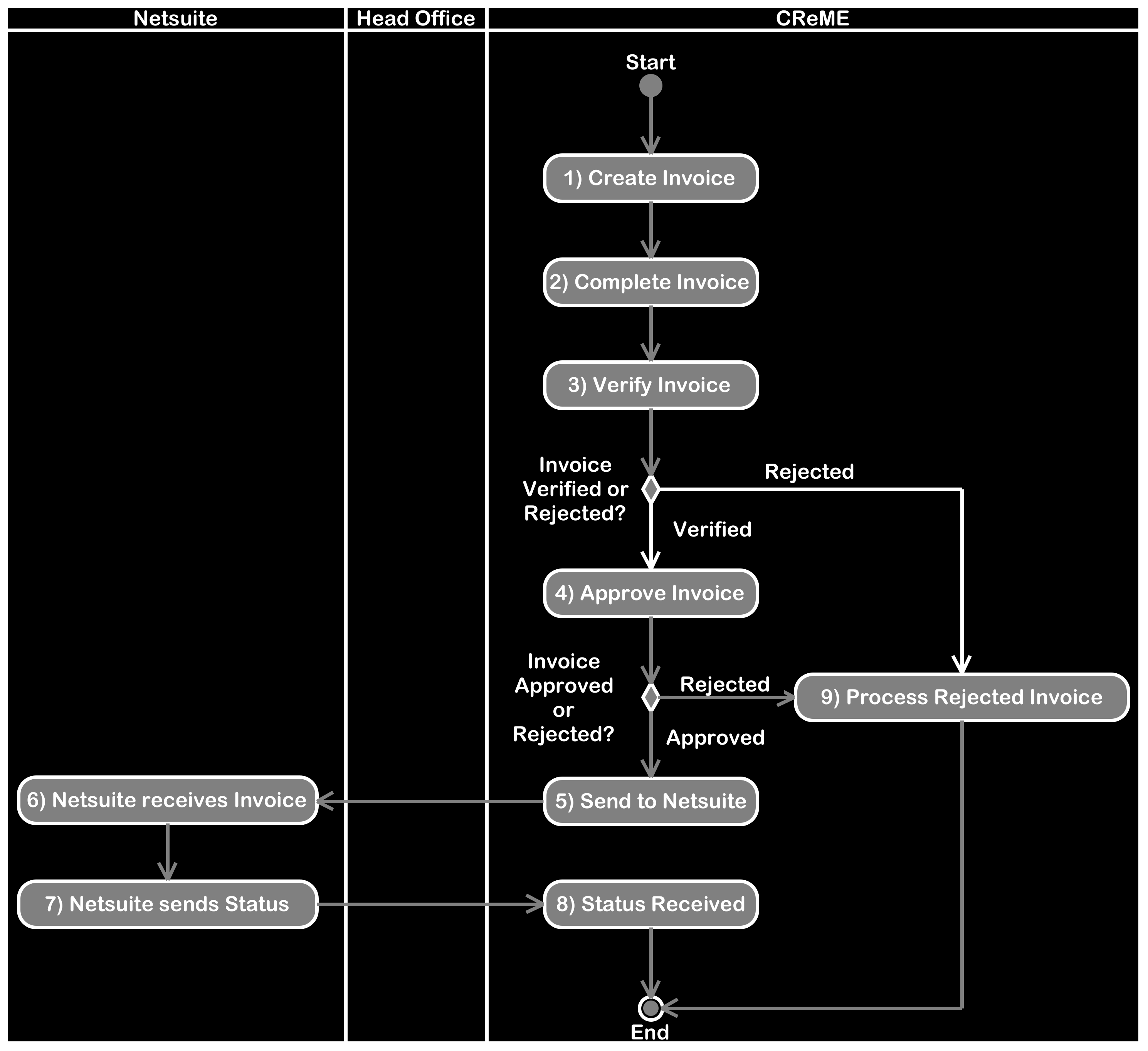
Using CReME™, one of the staff at the Operations Office creates an invoice.
2) Complete InvoiceWhen the user wants to send an invoice for verification, it is marked as "complete". "Completed" invoices can no longer be modified.
3) Verify InvoiceAfter the user performing Invoice Verification is satisfied the invoice information is correct, it is sent for Approval by marking it as "Verified".
If the user finds the invoice information is incorrect, is rejected.
4) Approve InvoiceAfter the user approving the invoice is satisfied the invoice information is correct, it is marked as "Approved".
If the user finds the invoice information is incorrect, is rejected.
5) Send to NetsuiteInvoices within CReME will be sent to Netsuite provided they fulfill the following criteria:
self-explanatory
7) Netsuite sends statusNetsuite processes the invoice according to internal business rules and responds to CReME™.
8) Status received by CReME™CReME™ processes the response received according to internal business rules, if any.
B) Data DescriptionThis section describes the structure of invoice data that will be transmitted to Netsuite from CReME™.
A sample invoice is shown below.
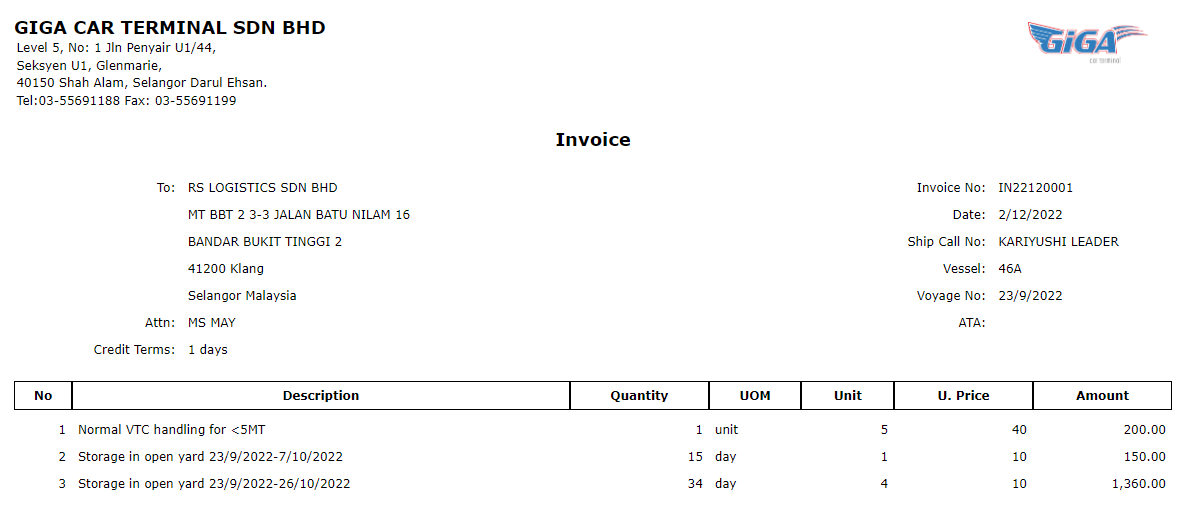
The following table describes the fields of an invoice.
| Human-Friendly Name | Machine-Friendly Name | Format | Description | Mandatory |
|---|---|---|---|---|
| Document Type | >DocumentType | Fixed Text | Always "Invoice" | Yes |
| Invoice Number | >InvoiceNo | Running number in the form of yymmxxxx where yy=year, mm=month and xxxx is a running number from 0001 to 9999 that refreshes every month. | Generated by CReME | Yes |
| CReME Invoice Id | CremeInvoiceId | integer eg 2749611, 7 or more digits | For use within CReME™. The universal identifier between Netsuite & CReME™. This number is always unique. | Yes |
| Customer Name | CustomerName | 50 characters long | Maps to Netsuite "companyname" | Yes |
| CReME Customer Id | CremeCustomerId | integer eg 2749611, 7 or more digits | Please refer to the Create Customer document for more information | Yes |
| Netsuite Customer Id | NetsuiteCustomerId | integer | This field is mandatory. Invoices will only be transmitted to Netsuite after this value has been inputted to CReME™ | Yes |
| Date | Date | Date in yyyy-MM-dd format | The date that appears when the document is printed. Not necessarily the date when the document was created as CReME™ allows editing of this field. | Yes |
| Credit Terms | CreditTermsInDays | Maximum payment period for customer to pay | Maps to Netsuite "terms" | Yes |
| Invoice Line Items | ||||
| Item Number | No | integer | 1,2,3,... | Yes |
| Item Description | Description | Text | Yes | |
| Quantity | Quantity | Integer | The multiples for that particular service. For storage, this number denotes the number of days in storage. In the invoice shown above, quantity in line 3 indicates a storage duration of 34 days. | Yes |
| Unit of Measurement | UOM | text | The unit of measurement for that particular service. For storage, the UOM is a day. | Yes |
| Unit Count | Unit | Integer | Denotes the number of vehicles this service has been applied to. In the invoice shown above, Unit in line 3 indicates 4 vehicles are involved. | Yes |
| Unit Price | UnitPrice | #,###.00 | Denotes the cost of this service per vehicle | Yes |
| Amount Excluding Tax | GrossAmount | #,###.00 | The value of this line item (Quantity x Unit x Unit Price). In earlier versions of this specification, this field was named "Amount" | Yes |
| Tax Amount | TaxAmount | #,###.00 | Yes | |
| Netsuite Tax Code | NetsuiteTaxCode | integer | For Tax Amount=0%, the Tax Code=5. For Tax Amount=6%, the Tax Code=308. Sandbox and Production use the same values. | Yes |
| Amount Including Tax | Total | #,###.00 | Equivalent to the Amount Excluding Tax + Tax Amount | Yes |
| CReME Voyage Id | CremeVoyageId | Integer | The identifier reflecting Vessel Title and Voyage Number | Yes |
| Destination | ToLocation | Text | Fixed at Port Klang. No other values are possible. | No |
| Vessel Title | Mode | Text | Name of the ship | Yes |
| Voyage Number | ModeNo | Text | Each vessel will have multiple voyage numbers. One for each voyage.It is possible for different vessels to share the same voyage number. | Yes |
| Ship Call Number | ShipCallNo | Text | Assigned by the port authority | No |
| ATA | ATA | Date in yyyy-mm-dd format. Only year, month and day will be provided. Time is not required. | ATA=Actual Time of Arrival. Applies for export and import shipments | Yes |
| Netsuite Item Id | NetsuiteItemId | integer such as 5900, 5997, 5901 etc | For the list of values, please refer to the mapping table below | Yes |
The Netsuite equivalent of CreME™ charge types. Example CReME™ charge types are open storage, covered storage, storage rebate, handling, handling rebate, PDI, PDI rebate, roro, stevedorage and tally. The CReME™ charge type will not be transmitted. Only the Netsuite Item Id will appear in the transmitted data. Netsuite to provide the list of codes for current and future use. According to Netsuite Technical Requirement Document 3a(ii), "Activity Type, Mode, Mode # date should match with the data at Netsuite. If the value does not match with the Netsuite data, script will add the data based on the data available at transaction pushed from the base system." It is possible this (Netsuite Segment Code) could be renamed to Activity Type, Mode and Mode #. This will be confirmed after discussion with the Netsuite team.
The table below lists the mapping of CReME™ Charge Types to Netsuite Segment Codes (Netsuite Item Id).
| CReME™ Charge Type | Netsuite Item Id (Production) | Netsuite Item Id (Sandbox) |
|---|---|---|
| BM | 6001 | 5900 |
| covered storage | 6002 | 5932 |
| covered storage rebate | 6003 | 5997 |
| DECK | 6004 | 5901 |
| DRIVER | 6005 | 5902 |
| DRIVER2 | 6006 | 5998 |
| FORKLIFT | 6007 | 5904 |
| FORKLIFT1 | 6008 | 5905 |
| FORKLIFT2 | 6009 | 5906 |
| FORKLIFT3 | 6010 | 5907 |
| FORKLIFT4 | 6011 | 5908 |
| FORKLIFT5 | 6012 | 5909 |
| FORKLIFT6 | 6013 | 5910 |
| FUEL | 6014 | 5911 |
| general cargo | 6015 | 5926 |
| handling rebate | 6016 | 5922 |
| LANDED | 6017 | 5914 |
| LASHING-GCT | 6018 | 6004 |
| LOCKSMITH | 6041 | 5916 |
| LOW LOADER | 6019 | 5917 |
| MAFI-GCT | 6020 | 5999 |
| MECHANIC-GCT | 6021 | 6000 |
| normal handling | 6022 | 5912 |
| open storage | 6023 | 5931 |
| open storage rebate | 6024 | 6098 |
| PDI | 6025 | 5920 |
| PDI rebate | 6026 | 5923 |
| PRIME MOVE | 6027 | 5921 |
| REFUEL-GCT | 6028 | 6001 |
| RORO MDB | 2914 | 2914 |
| RORO non-MDB | 6029 | 5898 |
| SHIFTING | 6030 | 5927 |
| SHIFTING1 | 6031 | 5928 |
| SHIFTING2 | 6032 | 5929 |
| SHIFTING3 | 6033 | 5930 |
| shut out handling | 6034 | 5913 |
| stevedorage | 6035 | 5899 |
| tally | 6036 | 5933 |
| TRAILER-GCT | 6037 | 6002 |
| TUG MASTER-GCT | 6038 | 6003 |
| UNLASHING-GCT | 6039 | 6005 |
| WASHING | 6040 | 5937 |
This section describes the structure of credit and debit note data that will be transmitted to Netsuite from CReME™.
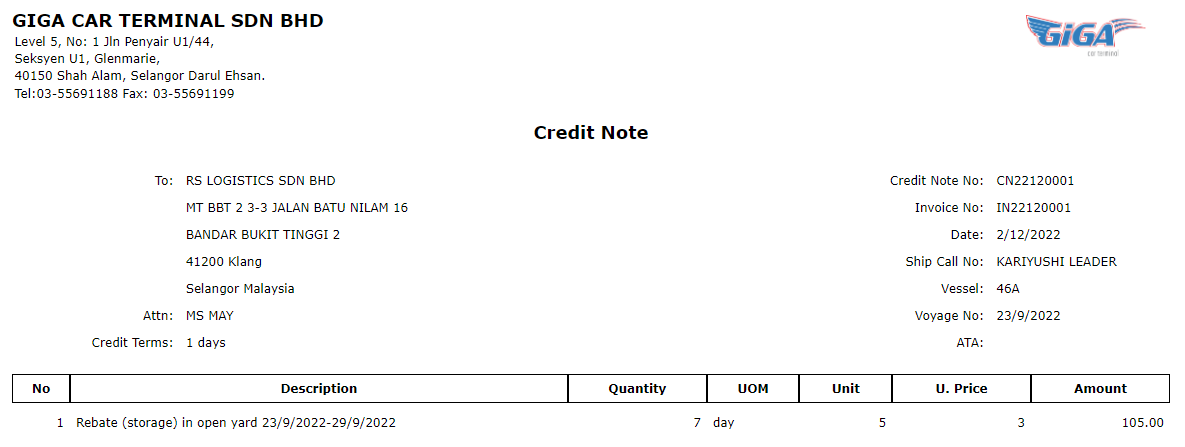
A sample credit note is shown below.
Here is a sample debit note.
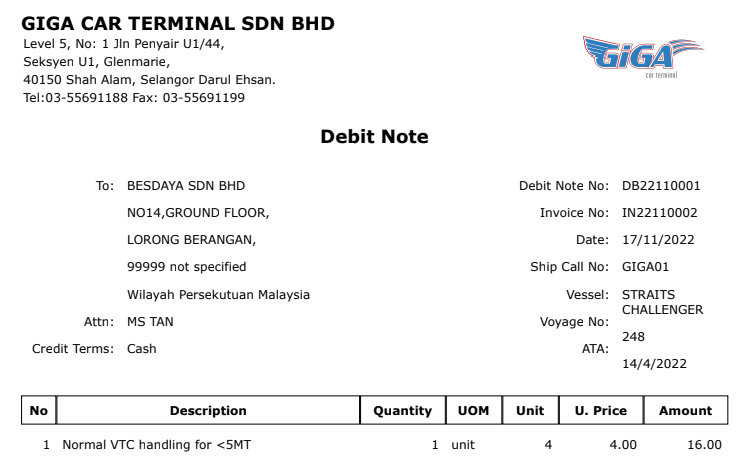
The following table describes the fields of a Credit/Debit Note.
| Human-Friendly Name | Machine-Friendly Name | Format | Description | Mandatory |
|---|---|---|---|---|
| Document Type | >DocumentType | Fixed Text | Either "Credit Note" or "Debit Note" | Yes |
| CReME Invoice Id | CremeInvoiceId | same as for invoice | same as for invoice | Yes |
| Credit/Debit Note Number | >CreditDebitNoteNo | Running number in the form of yymmxxxx where yy=year, mm=month and xxxx is a running number from 0001 to 9999 that refreshes every month. | Generated by CReME | Yes |
| CReME Credit/Debit Note Id | CreditDebitNoteId | integer eg 2749611, 7 or more digits | For use within CReME™. The universal identifier between Netsuite & CReME™. This number is always unique. | Yes |
| Date | Date | Date in yyyy-MM-dd format | The date that appears when the document is printed. Not necessarily the date when the document was created as CReME™ allows editing of this field. | Yes |
| Credit/Debit Note Line Items | ||||
| Item Number | No | same as for invoice | Yes | |
| Item Description | Description | Yes | ||
| Quantity | Quantity | Yes | ||
| Unit of Measurement | UOM | Yes | ||
| Unit Count | Unit | Yes | ||
| Unit Price | UnitPrice | Yes | ||
| Amount Excluding Tax | GrossAmount | Yes | ||
| Tax Amount | TaxAmount | Yes | ||
| Netsuite Tax Code | NetsuiteTaxCode | Yes | ||
| Amount Including Tax | Total | Yes | ||
| CReME Voyage Id | CremeVoyageId | Yes | ||
| Destination | ToLocation | Yes | ||
| Vessel Title | Mode | Yes | ||
| Voyage Number | ModeNo | Yes | ||
| Ship Call Number | ShipCallNo | No | ||
| ATA | ATA | Yes | ||
| Netsuite Item Id | NetsuiteItemId | Yes | ||
This section describes the technical aspects of transmitting Financial Document information from CReME™ to Netsuite.
1) Invoice DataThis section illustrates an example JSON message of invoice data.
This section illustrates an example JSON message of credit note data.
Debit Note data follows the same structure as Credit Note Data except for "DocumentType": "Debit Note"
4) Structure of responseThis section describes the structure of the response from Netsuite after CReME™ has transmitted the customer information. This information was emailed by Rida on 17-Apr-2023.
| Status | Name | Transaction | Details |
|---|---|---|---|
| 200 | RECORD_UPDATED | Customer | The existing customer record has been updated. |
| 201 | RECORD_CREATED | Customer, Invoice, Credit Note, Debit Note | The new record has been created. |
| 204 | NO_CONTENT | - | The document type is not defined correctly. |
| 400 | BAD_REQUEST | Customer, Invoice, Credit Note, Debit Note |
Action is not performed. |
| 404 | NOT_FOUND | Invoice, Credit Note, Debit Note |
1. Customer in the payload of the invoice not found. 2. Invoice in the payload of Credit/Debit Note not found. |
| 409 | RECORD_ALREADY_EXISTS | Invoice, Credit Note, Debit Note |
The record already exists. |
This section describes the interaction between the Customer and Invoice processes.
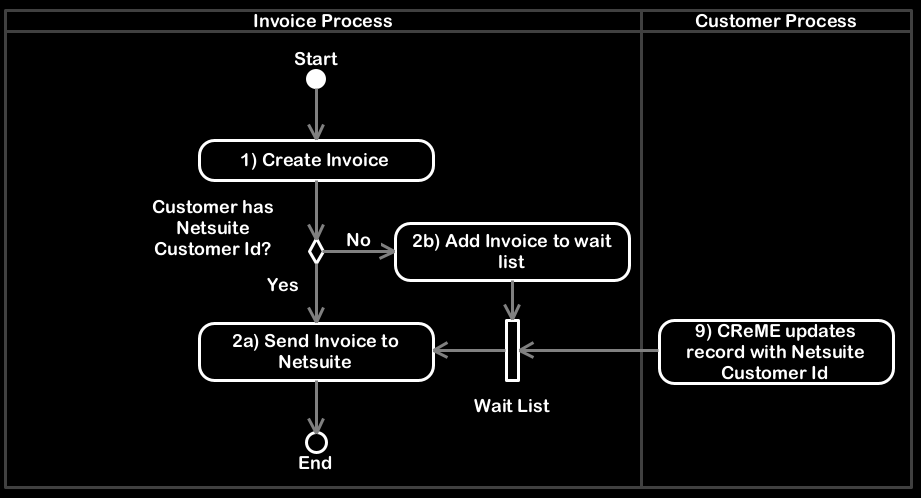
When an invoice is created within CReME™, it is not automatically transmitted to Netsuite. CReME™ first checks whether the customer that the invoice is addressed to exists within Netsuite. This is indicated by the existence of the NetsuiteCustomerId of that customer within CReME™.
2a) Send Invoice to NetsuiteIf the NetsuiteCustomerId is found, the invoice is sent to Netsuite.
2b) Add Invoice to wait listIf the NetsuiteCustomerId is not found, the invoice is added to a wait list. This wait list consists of invoices that are being held back from Netsuite for the same reason.
9) CReME™ updates record with Netsuite Customer Id
This step refers to step #9 of the Customer process. For further information, please refer to Section A of Create Customer
Specification Document. The wait list is triggered by two conditions:
1) step 2b
2) step 9
If both these conditions are met, step 2a is carried out.
This section describes the interaction between the Credit / Debit Note and Invoice processes.
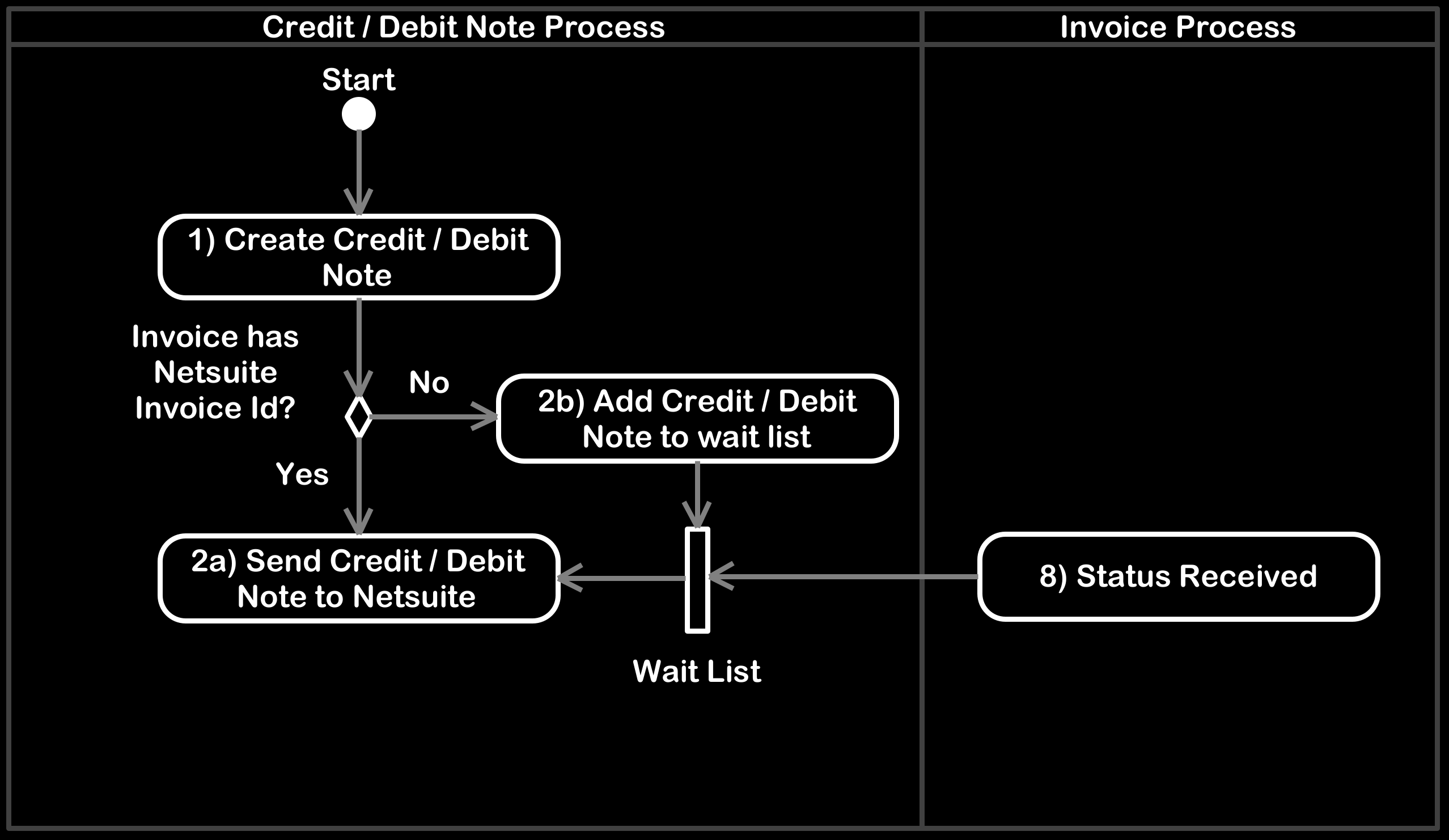
When a Credit / Debit Note is created within CReME™, it is not automatically transmitted to Netsuite. CReME™ first checks whether the invoice that the Credit / Debit Note refers to exists within Netsuite. This is indicated by the existence of the NetsuiteInvoiceId within CReME™.
2a) Send Credit / Debit Note to NetsuiteIf the NetsuiteInvoiceId is found, the Credit / Debit Note is sent to Netsuite.
2b) Add Credit / Debit Note to wait listIf the NetsuiteInvoiceId is not found, the invoice is added to a wait list. This wait list consists of Credit / Debit Notes that are being held back from Netsuite for the same reason.
8) Status Received
This step refers to step #8 of the Invoice process. For further information, please refer to Section A of this
document. The wait list is triggered by two conditions:
1) step 2b
2) step 8
If both these conditions are met, step 2a is carried out.