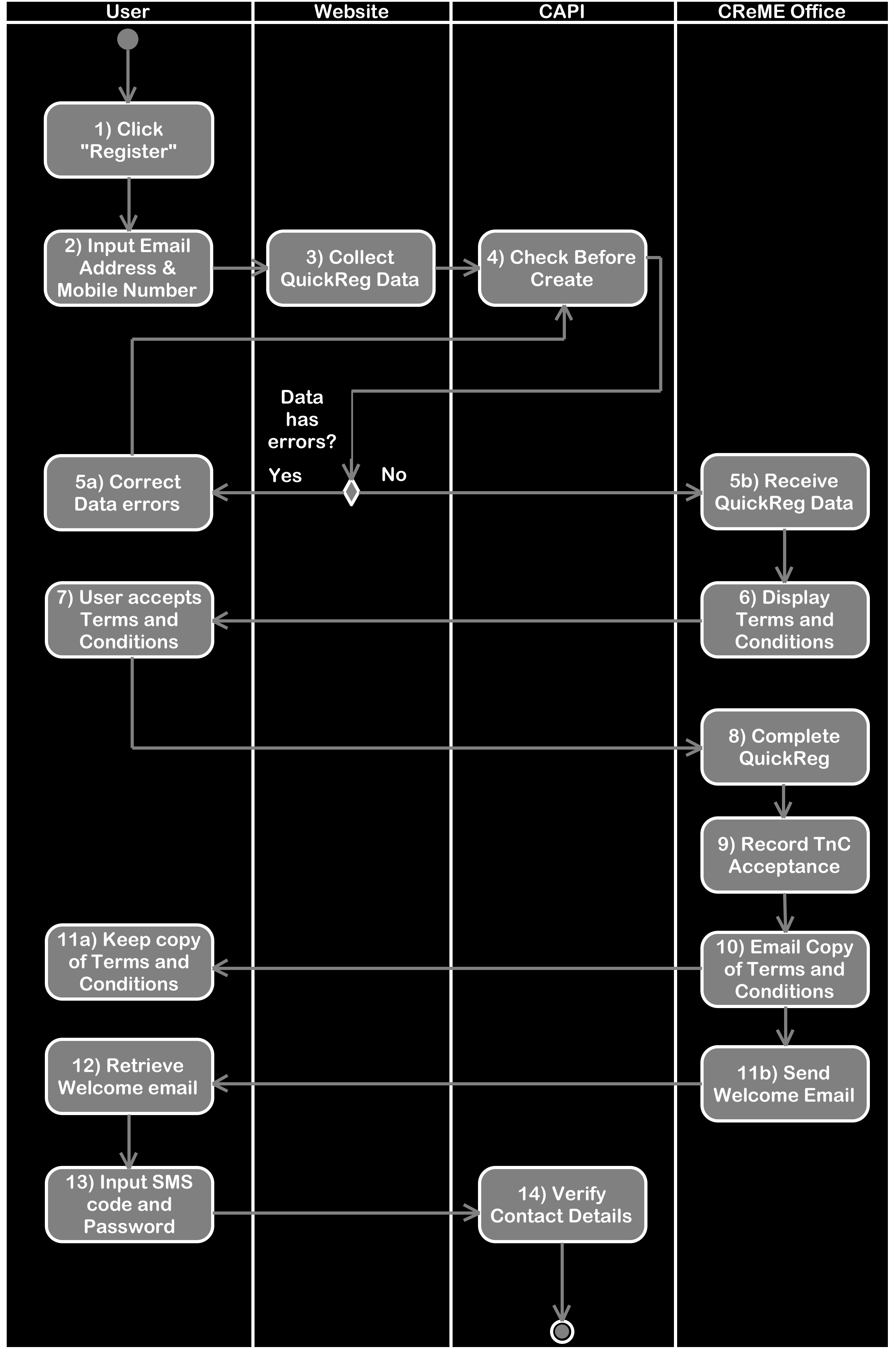
This document guides the developer on how to use CAPI services and CReME™ Office webpages to perform a QuickReg. The reader is advised to familiarise himself/herself with the Quick process by reading CReME™ QuickReg before this.
The user is also assumed to be familiar with CAPI - Introduction.
This document guides the developer on how to use CAPI services and CReME™ Office webpages to perform a QuickReg. The reader is advised to familiarise himself/herself with the Quick process by reading CReME™ QuickReg before this.
Integration This document will focus on explaining step 4, 5b and 13.
To request the Check Before Create service,
A Status Description of "Person.Create can proceed" indicates there will be no issues with the data when performing the QuickReg later on. After receiving such a response, the website can proceed to step 5b. If some other StatusDescription was received, the website should lead the user to step 5a where the error can be corrected.
Step 5b: Receive QuickReg DataStep 5b is when the website submits the QuickReg information to CReME™ Office.
The following section explains the query string parameters used in the Get request of this page.
TermsAndConditions:should always be "ReadForQuickRegFromOutsideCReME"
ChannelKey should be a 24-character string. When under development, the Test key should be used until it's time to go live by which time the Live key should be used.
GivenName and Surname can accept spaces provided the string is enclosed in double quotes. For example, "Thong Hooi" is acceptable.
EmailAddress must follow the format of a valid email address such as "@", domain name etc.
Mobile Phone Number must begin with a country code such as "60" for Malaysia, "44" for United Kingdom etc.
ClubCode is selected from the drop down list by pairing the ClubTitle with the ClubCode.
CallbackURL is the URL of the website page that will display the StatusDescription from CReME™ Office. When specifying the URL, do not include "http://" nor "https://" at the beginning. You may include folders after the domain. For example, "www.bizt.my/p" is acceptable. CReME™ Office will automatically add "StatusDescription=" followed by the value of the StatusDescription parameter.

In the example above, the CallbackURL is "www.bizt.my". All other components are automatically added by CReME™ Office.