This document explains what happens when a user taps on MyCalendar within the Gym Mobile App of CReME™
This information applies to classes or training sessions where the booking has been confirmed. It does not apply if the class/session is waitlisted or cancelled.
GX ClassesThis section explains what happens when a user taps on My Calendar for a GX class.
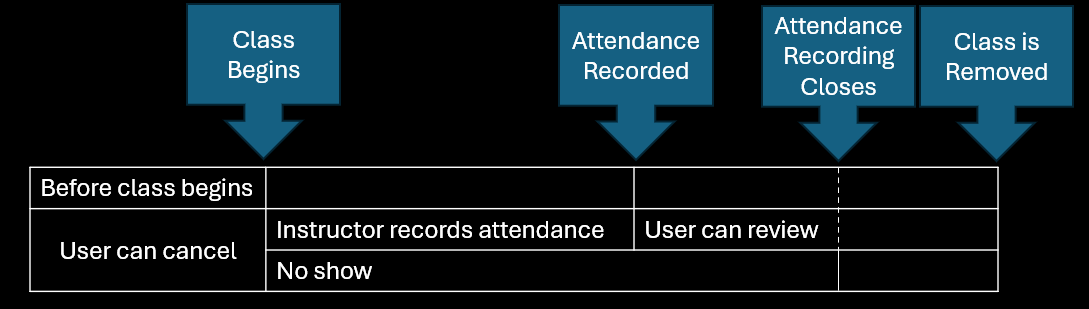
Before a class begins, tapping on My Calendar allows the user to cancel his/her class booking.
After the class begins, the instructor records attendance. He/she is able to do this anytime between the start of the class and when the attendance recording window closes. This is typically 4 hours after the start of the class.
After attendance has been recorded, the user is able to review the class. Reviewing a class is not mandatory.
After the class is removed from My Calendar, no further actions are allowed by the user. This is typically 12 hours after the start of the class.
If the user does not show up for the class, no further actions are allowed. Instead, he/she will be subject to demerit points.
PT ClassesThis section explains what happens when a user taps on My Calendar for a PT session.
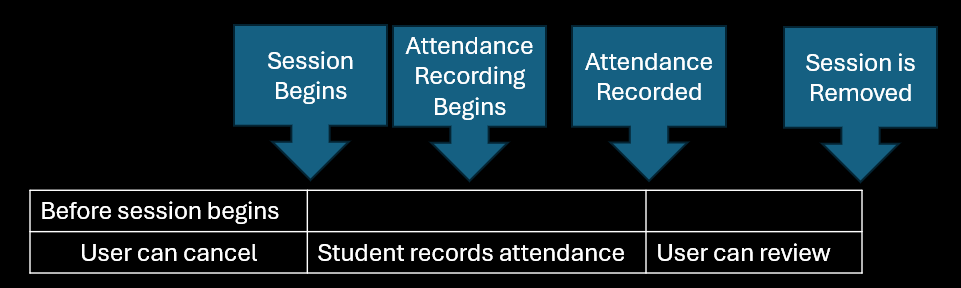
Before a session begins, tapping on My Calendar allows the user to cancel his/her session booking.
After Attendance Recording begins, tapping on MyCalendar automatically records the user's attendance. This is typically allowed 30 minutes after the start of the session. The user is given the option to review the session.